Amazon review software refers to seller software that turns delivered Amazon orders into review requests, buyer surveys and star ratings without manual follow-up. Amazon review software links to Seller Central and automates Amazon’s Request a Review for eligible orders. GetReviews runs that workflow for FBA and FBM sellers inside Amazon’s review policy.
How it works
🔗
Connect Amazon
→
↓
👀
GetReviews tracks eligible orders
→
↓
📨
Amazon’s Request a Review message is sent automatically
Amazon review software is a seller application that connects to an Amazon seller account and sends compliant review requests to buyers after each eligible order. The application belongs to the class of Amazon seller software, beside repricers, inventory tools and listing alerts. The attributes of the application are one order feed, one request trigger per order and a review policy that applies to every request. The relationship that defines the software is its connection to Seller Central.
How Does Amazon Review Software Connect to Seller Central?
Amazon review software connects to Seller Central through the Amazon Selling Partner API (SP-API), a secure connection the seller authorizes inside the account. The seller authorizes the application once, and the authorized application then reads order data for the marketplaces the seller connects. Eligible orders trigger the review request. Ineligible orders, such as refunded, returned or cancelled orders, are excluded automatically.
Authorizing the connection takes the seller one login, without sharing Seller Central credentials or using unauthorized workarounds.
What Are the 5 Types of Amazon Review Software?
There are 5 types of Amazon review software based on the step of the post-purchase funnel each type automates. The types are Request a Review automation tools, buyer-seller messaging tools, insert card funnel tools, review monitoring tools and all-in-one review platforms.
Request a Review automation tools, which trigger Amazon’s own review request button on each eligible order.
Buyer-seller messaging tools, which send a templated, permitted message through Amazon’s messaging channel.
Insert card funnel tools, which route a scanned package insert to a survey page.
Review monitoring tools, which track new reviews and rating changes after publication.
All-in-one review platforms, which combine several of these steps in one dashboard.
Knowing the five types lets a seller match the tool to the funnel step that leaks the most reviews.
How Does Amazon Review Software Work From Delivery to Published Review?
Amazon review software works by triggering a review request for each eligible order and leaving the decision to review with the buyer. The workflow runs in 5 steps.
1
Order arrives
Your Amazon orders reach GetReviews through your authorized connection.
2
Request is scheduled
GetReviews queues each eligible order for the delay you set, inside Amazon's 5-to-30-day window.
3
Buyer is reached
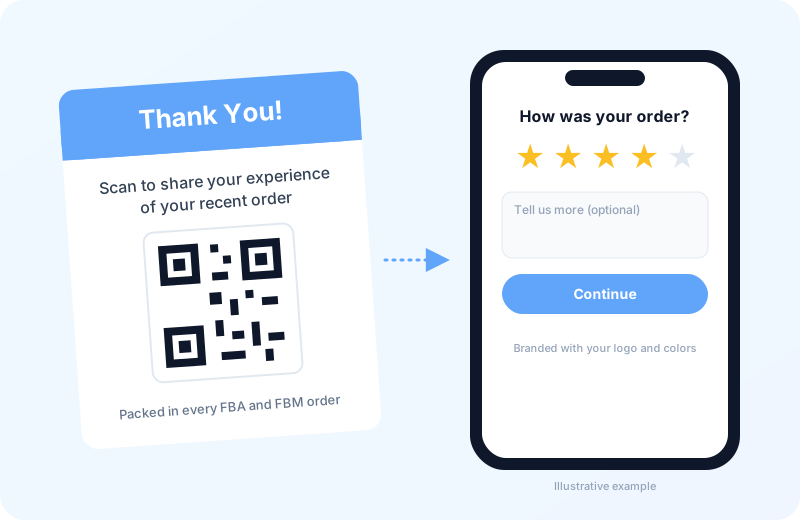
The buyer receives Amazon's own Request a Review message, or scans the QR insert card in the package.
4
Buyer shares feedback
The buyer can rate the purchase on your branded survey page.
5
Buyer decides
The buyer chooses whether to post a review on Amazon. Amazon hosts the form.
The request goes to every eligible order on the same schedule. It is never filtered by star rating, survey answer or sentiment. Mapping the workflow from delivery to review shows why sellers need the software in the first place.
Why Do Amazon Sellers Need Review Software?
Amazon sellers need review software because review count and star rating influence conversion and visibility on every Amazon listing. Star rating is the mean of the ratings a listing has published, and it moves with each new review. A listing with a higher star rating converts more searchers than the same listing with fewer reviews. Review velocity, meaning the number of new reviews per week, keeps the rating current after a product launch.
Manual follow-up produces a low and irregular review velocity. Review software raises the velocity by requesting a review on each eligible order rather than on the orders a team remembers. The gap between orders and reviews is the number that makes the case.
How Many Amazon Orders Turn Into Reviews Without Software?
Unprompted Amazon orders commonly turn into reviews at a rate of between 1 and 2 reviews for every 100 delivered orders. The review rate is the share of delivered orders that produce a published review. At a 1 percent review rate, a product selling 500 units a month collects 5 reviews a month.
Sending Amazon’s Request a Review on every eligible order can lift the review rate above the unprompted baseline. The lift depends on requesting on 100 percent of eligible orders, and requesting on every order is the part that breaks down when a seller clicks manually.
Why Does Clicking Request a Review Manually Break Down at Scale?
Clicking Request a Review manually breaks down at scale because each click covers one order, one time, inside a window Amazon closes after 30 days. The Request a Review button is a per-order control inside the Manage Orders page of Seller Central. One click serves one order, and no bulk option exists on the page.
A seller shipping 1,000 orders a month owes 1,000 clicks spread across a moving window. Missed orders leave the window permanently, and a missed order returns no review. Review software replaces the missed clicks with a scheduled request for each order, which is the first feature GetReviews includes.
What Does GetReviews Amazon Review Software Include?
GetReviews Amazon review software includes 6 features that cover the post-purchase funnel from the order to the published review. The features are Request-a-Review automation, scannable insert cards, branded survey pages, buyer feedback follow-up, a monthly AI summary of collected reviews and Amazon policy alignment. The 6 features are described below.
1. Request-a-Review Automation Through Amazon SP-API
Request-a-Review automation is the scheduled triggering of Amazon’s Request a Review button for every eligible order. The automation sends each request after the number of days the seller sets, and Amazon confirms eligibility inside its 5-to-30-day window. Timing rules, product exclusions and marketplace settings stay under the seller’s control.
GetReviews runs the automation for FBA and FBM orders on each Amazon marketplace you connect. Sellers set the timing once and let the request queue run in the background. A Review Requests dashboard shows how many requests were sent, skipped or failed.
2. Scannable Insert Cards Inside FBA and FBM Packages
A scannable insert card is a printed card packed with the product that carries a QR code pointing to the seller’s survey page. The card reaches the buyer at the unboxing moment, before the Request a Review message arrives.
GetReviews includes an insert card designer with templates you customize with your logo, colors, headline and message. The QR code links to the survey you choose, and you download the card to print for FBA prep or FBM packing. Keep the wording neutral and free of rewards.
3. Branded Survey Pages for Amazon Buyers
A branded survey page is a seller-hosted landing page where a buyer rates the purchase and shares feedback. The page carries the seller’s logo, colors and product images, and can run on a custom survey domain. Order-number validation can be turned on per marketplace when the seller wants to confirm that a respondent placed an order.
GetReviews builds the page from the seller’s brand assets and hosts it without code. Sellers direct every insert scan to the same survey page.
4. Buyer Feedback Follow-Up Alongside the Review Request
Buyer feedback follow-up is a way for a seller to hear about a problem and help the buyer directly. When a buyer leaves a low rating with written feedback and an email address, GetReviews notifies the seller so support can follow up on the order.
Follow-up is offered in addition to the Amazon review request and never in place of it. Amazon’s Request a Review is sent to every eligible order on the same schedule, independent of survey answers. Sellers resolve the defect, the shipping delay or the missing part while the buyer keeps full freedom to review.
5. Monthly AI Summary of Collected Review Themes
A monthly AI review summary is a machine-generated digest that groups the written reviews collected through your GetReviews surveys into named praise and complaint themes. The summary reads the past month’s written feedback and counts how often each theme appears, such as sizing, packaging or battery life.
GetReviews emails the summary each month once enough written reviews have been collected, with recommendations drawn from what buyers love and what they complain about. Sellers read one digest instead of scrolling hundreds of responses.
6. Amazon Policy Alignment Built Into Request-a-Review
Amazon policy alignment means the review request follows the rules Amazon sets for every seller. GetReviews uses Amazon’s own Request a Review message, so there is no custom wording that asks for a positive review or offers a reward.
The automation skips refunded, returned and cancelled orders, lets sellers exclude specific ASINs, and sends one request per order. Sellers stay inside the policy that Amazon enforces on every review request.
Running the 6 features together lets a seller collect reviews on every eligible order while staying inside Amazon’s review policies.
Which Amazon Review Policies Does GetReviews Follow?
GetReviews follows Amazon’s Community Guidelines, the Communication Guidelines for Buyer-Seller Messaging and the Selling Partner API Acceptable Use Policy. Amazon’s Community Guidelines are the rules that set the content Amazon permits in a review and the request it permits a seller to send. The Communication Guidelines set the permitted content and frequency of messages to buyers. The API Acceptable Use Policy governs how an application reads and stores order data. Following the three policies separates allowed tactics from prohibited tactics.
Allowed vs Prohibited Amazon Review Tactics
Allowed Amazon review tactics are requests that ask every buyer for an honest review, carry no incentive and apply no filter on the rating. Prohibited Amazon review tactics are requests that pay for, filter or steer a review toward a rating. The table compares the two sets on the dimensions Amazon enforces.
Swipe the table sideways to compare →
Allowed versus prohibited Amazon review tactics by dimension
Dimension
Allowed tactic
Prohibited tactic
Request channel
Amazon's Request a Review button
Off-Amazon message asking for a review
Wording
Neutral request for an honest review
Request for a positive or 5-star review
Incentive
No gift, refund or discount for a review
Gift card, refund or discount for a review
Rating filter
Amazon review option offered to every buyer
Review option shown only to satisfied buyers
Reviewer
Verified buyers of the product
Friends, family, employees or paid reviewers
Follow-up
One request per order
Repeated requests for the same order
Insert cards
Neutral card with a QR code to a survey
Card that asks for 5 stars or offers a reward
Two misreadings are common. An insert card is not prohibited, because a neutral card is allowed. Review gating is not a grey area, because gating is prohibited. Reading the two columns side by side shows that the channel is never the violation and the steering always is. The steering is what Amazon punishes on the seller account.
What Happens to Seller Accounts That Manipulate Reviews?
Seller accounts that manipulate reviews face review removal, listing suppression, account suspension and legal action from Amazon. Review removal deletes the manipulated reviews together with every rating attached to them. Listing suppression hides the ASIN from search until Amazon reinstates it. Account suspension freezes the seller’s Seller Central access and can hold disbursements. Legal action follows for sellers and review brokers Amazon sues in civil court. Avoiding the four penalties is the reason compliant review software carries a monthly cost.
How Much Does Amazon Review Software Cost?
Amazon review software costs a monthly subscription. GetReviews prices its plans by the number of reviews collected each month, not by order volume, and every plan includes unlimited Amazon Request-a-Review automation. Entry plans cover low-volume sellers, and higher plans add review capacity and features.
Comparing the subscription against the reviews it recovers is the first step in choosing the software.
How to Choose Amazon Review Software
Choosing Amazon review software follows 5 checks that a seller runs before connecting an account.
Verify the SP-API connection, since a tool without an authorized connection scrapes data or asks for login credentials.
Confirm Request a Review automation, since Amazon’s own button is the request channel built for this purpose.
Inspect the survey flow, since a page that hides the Amazon review option from unsatisfied buyers is review gating.
Check marketplace and fulfilment coverage, since FBA, FBM and every marketplace you sell in need one queue.
Match the plan tier to the reviews you expect to collect, since paying for unused capacity raises the cost per review.
Running the five checks separates review software from the two alternatives sellers weigh against it, Amazon Vine and review monitoring tools.
Amazon Review Software vs Amazon Vine: Which Fits a Product Launch?
Amazon review software and Amazon Vine both generate reviews for a listing under Amazon’s own programme rules. Amazon Vine is Amazon’s invitation-only programme in which Brand Registry sellers give free units to Vine Voices in exchange for a review. The two differ in reviewer, cost basis, volume ceiling and duration.
Vine draws reviews from Amazon-selected Vine Voices and requires free units plus any enrollment fees Amazon charges. Vine caps enrollment per parent ASIN and ends when the units are claimed. Review software draws reviews from paying customers, charges a monthly subscription, scales with order volume and runs for the life of the listing. Amazon Vine fits the first reviews of a launch, whereas Amazon review software fits every review after the first order ships.
Amazon Review Software vs Review Monitoring Tools
Amazon review software and review monitoring tools both support a seller’s review strategy, but they act at different moments. A review monitoring tool is a tracking application that alerts the seller when a new review, rating change or competitor review appears. The two differ in direction, trigger and output.
A monitoring tool reads reviews after publication, triggers on a new review and outputs an alert. Review software acts before publication, triggers on an eligible order and outputs a review request. Monitoring shows the seller what happened, and review software changes what happens next. GetReviews focuses on the request side, so sellers who need alerts on new or competitor reviews pair it with a dedicated monitoring tool.
Which Amazon Sellers Use Review Software?
Amazon sellers who use review software are FBA, FBM and hybrid sellers and private label brands. The two seller groups are described below.
FBA, FBM and Hybrid Sellers
FBA, FBM and hybrid sellers are Amazon sellers grouped by who ships the order: Amazon, the merchant or both. FBA (Fulfilment by Amazon) sellers ship through Amazon’s warehouses and gain the Prime badge. FBM (Fulfilment by Merchant) sellers pack and ship from their own location. Hybrid sellers split ASINs between the two channels. Amazon’s Request a Review works for orders from both channels, so sellers on any fulfilment model run one request queue for every eligible order.
Private Label Brands
A private label brand is a seller-owned brand that manufactures products under its own name and sells them on Amazon with Brand Registry protection. The brand controls the packaging, so an insert card ships inside every unit. Brand Registry unlocks A+ content, the Vine programme and brand-level analytics. Review software adds the insert funnel, the branded survey page and the review request to the brand’s own packaging. Brands treat the review flow as part of the product experience rather than a separate task.
Reading the two groups together shows that every seller type shares the same outcome metric, the star rating.
What Shapes an Amazon Star Rating?
An Amazon star rating is the average of published ratings on a listing. It is shaped by 4 forces: 1-star reviews, the post-purchase funnel, customer videos and Amazon review policy changes. The four forces are described below.
Why Amazon Buyers Leave 1-Star Reviews
Amazon buyers leave 1-star reviews because the product, the delivery or the listing failed an expectation. A 1-star review is the lowest published rating on a listing, and it pulls the average down more than any other rating. The common triggers are a defective unit, a late FBA delivery, a size or colour mismatch and a listing that oversold the product.
Fast, helpful customer support gives buyers a way to get a problem fixed. It works alongside the public review option and never replaces it.
Post-Purchase Funnels for Amazon Orders
A post-purchase funnel is the sequence of touchpoints a buyer meets between the delivery event and the published review. The funnel can run from the insert card to the survey page and from Amazon’s Request a Review message to the Amazon review form. Each touchpoint either advances the buyer to the next step or loses the buyer to silence. A funnel with fewer steps between delivery and the review form loses fewer buyers. Sellers measure the funnel by scan rate, survey completion rate and review rate.
Customer Videos for Amazon Listings
A customer video is a buyer-recorded clip that shows the product in real use. Videos give shoppers proof from another buyer, which many trust more than a brand-produced clip. GetReviews collects customer videos through its Social Proof + UGC product, where buyers submit a clip and give consent for the seller to use it. The invitation to record a video is not limited to buyers who gave a particular rating.
Amazon Review Policy Changes
An Amazon review policy change is a revision to the Community Guidelines or the Communication Guidelines that alters which review tactics Amazon permits. Amazon revises the guidelines on no fixed schedule, and each revision applies to existing requests. A tactic allowed under an older version can become a violation on the day the revision takes effect. Because GetReviews sends Amazon’s own Request a Review message, sellers are not rewriting request templates each time the policy moves. Sellers should still re-check insert card and survey wording after each revision.
Reading the four forces together shows that the star rating is an outcome of the funnel a seller runs, which raises the questions sellers ask most often.
Yes. Review software that uses Amazon's own Request a Review feature and an authorized Selling Partner API connection works inside Amazon's rules. What Amazon prohibits is manipulation: paying for reviews, asking for positive reviews, and filtering who is asked.
Does Amazon review software write reviews?
No. Amazon hosts the review form and the buyer types every word. The software sends the request and helps you follow up on the buyer experience.
Can Amazon review software ask only happy buyers for reviews?
No. Amazon bans review gating, which means filtering who is asked for a review based on rating or sentiment. GetReviews sends Amazon's Request a Review to every eligible order on the timing you set, regardless of survey answers.
How long after delivery does Amazon review software send the request?
Amazon opens its Request a Review window 5 to 30 days after delivery. In GetReviews you choose how many days to wait, and Amazon makes the final eligibility check before anything reaches the buyer.
Does Amazon review software work for FBM orders?
Yes. Amazon's Request a Review is available for both FBA and FBM orders, so one request queue can cover every fulfilment model. Insert cards go into the parcel at pack-out for FBM orders.
Can one Amazon review software account cover several marketplaces?
Yes. You connect each Amazon marketplace you sell in under the same GetReviews login, and automation timing and exclusions are set per marketplace.
Is an insert card asking for a review allowed on Amazon?
Yes, an insert card is allowed if the wording stays neutral and offers no reward. A card that asks for 5 stars, or offers a gift, refund or discount for a review, breaks Amazon's Community Guidelines.
Automate Your Amazon Review Requests Today
Turn more Amazon orders into review opportunities without manually requesting reviews one order at a time.